Showing posts with label web. Show all posts

Friday, September 12, 2014

The second life of SVG

Scalable Vector Graphics (SVG) have been around for a while now. As the name suggests, it is a vector image format, ie, SVG images can be resized at no quality loss, just like fonts, and defined in plain text, in an XML format. Back in the early 2000's, it's support was very spotty, and early versions of Internet Explorer just snubbed it... so it basically was a non-starter for web development. It sailed through most of the decade, essentially unnoticed to the greater public, until the stars aligned Google put it on the spotlight.

What happened to SVG in the past decade?
  • Increased need for scalable graphics, independent of 3rd party? The boom of Internet connected devices created a jungle of screens of all shapes and sizes, likely making a workable vector image format much more appealing. Format specifications started evolving at a steadier pace, with version 1.1 being released in 2011, and version 2 underway.
  • SVG Support vastly improved, to the point it is now a perfectly fine option on all major browsers.
  • Other technologies have matured, such as CSS and javascript, to the point of leveraging the XML / txt nature of SVG by integrating it seamlessly to the structure of an HTML document. SVG elements can now be manipulated like any other HTML tags, styled, used for animation or even created on the fly, while retaining its sweet scalability.
Here's a sample SVG-based animation mimicking the type of skill cooldown commonly found in RPG games like World of Warcraft.

See the Pen EwoxL by Dod (@VoodooDod) on CodePen.


EDIT: Here's another sample showing SVG in action, using its native support for animations.

This isn't to say SVG has become the hammer to hit all your web nails with. When it comes to web drawing, HTML5 specs include canvas, essentially a drawing surface which is, in most cases, hardware accelerated. But as often in new technologies, it's not an exact overlap: for one, it's raster based, ie, drawn to-the-pixel for better rendering, but not resizing friendly. It is also very primitive in that all the drawing needs to be coded (SVG images can be vased in a separate file), and it doesn't integrate to HTML the way SVG does: what's in a canvas is not, for instance available to CSS styling or DOM events (click, roll-over, etc.); in short, it can make for great performances when used right, but becomes very tedious for the most basic tasks.

So SVG got a massive usability bump, but it still hasn't gained the level of visibility enjoyed by HTML5. While it can perform very similar functions to HTML5 canvas, they are not quite redundant either. As a rule of thumb, if you are using a limited number of shapes, and a big (or scalable) drawing area, SVG is the most convenient way to go; if you are dealing with picture perfect rendering, or with hundreds of animatable images, canvas is probably the only viable option to squeeze enough performance out of your browser. Either way, many javascript libraries exist to smooth the learning curve. I haven't dug too much into canvas-based libraries, but for SVG, I'd wholeheartedly recommend you to look into Raphael.js.

Monday, September 8, 2014

Icon font-ing

It is now common place that mobile device have favorable wind in their sails, and have become the dominant tool to consume web content. This isn't to say that good old desktop PCs and laptops are going anywhere soon: while they have been slowly giving way to their mobile counterpart, they remain the unchallenged tool to produce content. And this leaves designers/developers with an interesting challenge: how to create content that fits everyone, in a jungle of screens of all sizes and shapes? This is, obviously, a vast topic to tackle in one post, but this is where I was coming from when I started tinkering with icon fonts.

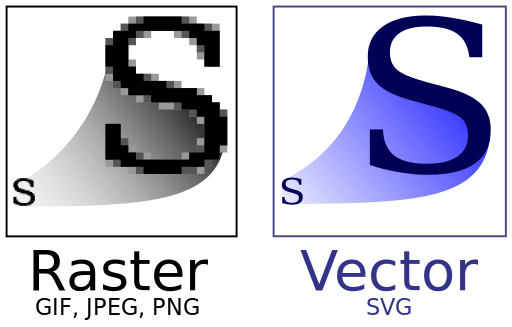
As any MS Word user already knows, fonts are normally used for lettering. But what are they? Essentially geometrically simple representations, defined as combinations of vectors, ie, they don't carry any notion of size. This means they are designed to be resized at no quality loss, and tend to be fairly lightweight. A picture being worth a thousand words:

*
Great! But... why, then is this not standard on all picture formats? You can find a detailed breakdown here, but basically, vectorized images, when looked up close (no resize), tend to be too blocky / pixelated, while their rasterized counterpart are closer to picture perfect but degrade poorly when resized up; so it boils down to a balancing act between quality and file size.

For all things web, size matters, especially for a visitor on a data plan! And icons, the kind of low detail mostly geometrical symbols, meant to be recognizable at a glance (just like letters), are what vectorized images were designed for in the first place. Packaging them in fonts also provides a nice added value by easing up the download / cache process (only 1 file to handle). But before looking into the gory details, what does that look like in practice? I made a canonical sample below, extracted from the very best demo I found on the web, to make it more inspection friendly (props goes to Chris Coyier, with the related post).

See the Pen iuxEs by Dod (@VoodooDod) on CodePen.

If you made it this far, you will probably be interested to know how to package your own images! As it happens, it is surprisingly easy with very little graphic design background required (full disclosure: I have none); here's a step-by-step:

  • Gather a suitable image set: remember these images will be vectorized, so be aware that a rasterized image (bitmap) with excessive details may look quite bad after conversion. Also, fonts store shapes, not colors! Turn your images to black and white (no greyscale) to get a feel of the final result; in the above sample, I used an image from the excellent 700+ RPG Icons collection by Lorc, posted there in the PNG format.
  • Vectorize your images: if you started out with a vector format (say SVG), you're good to go. Otherwise, check out potrace by Peter Selinger, an outstanding command-line conversion tool. In addition to outright conversion, it also allows to perform some transformations, and it lends itself nicely to batch operations; for instance, I batch converted Lorc's icons and inverted them in the process. It's worth playing with the various options for complex images to improve quality.
  • Compose your font: several online tools automate this process for you, but IcoMoon stood out in the crowd, especially since it is free to use, and rights are waived for your own images. IcoMoon requires the files to be provided in SVG (supported by potrace), and produces a ready-to-use package which comprises various font formats, leveraged by a generic CSS file using them as fallbacks to ensure broad browser support, and a sample web page demonstrating usage, in the form of a dictionary for your icon font. I generated this on Lorc's collection, feel free to check it out.

Enjoy!

EDIT: this post covers some of the same ground but focuses more on the creation process, with tools such as Inkscape.

* "Bitmap VS SVG" by Yug. Licensed under Creative Commons Attribution-Share Alike 2.5 via Wikimedia Commons


Wednesday, September 3, 2014

Converging to HTML5

I haven't had, in so far, much exposure to HTML5. There are some explanations to that: one is that my jobs in most the past few years have had me work on thick clients or back ends, the kind of heavy lifting done against proprietary systems / architecture, targeted to internal customer only; another is that the specs on HTML5 are still evolving, and in the corporate world, most of the existing body of work rely on established solutions (or at least perceived so). Still, the web has become ubiquitous, and I had my fair share of ASP .NET, peppered with javascript / JQuery and CSS, just not the bleeding edge kind of project.

Increasingly, though, the HTML5 specs are taking shape, and javascript and CSS have matured in amazing ways since the days where I did full time web development (2004!). And while I'm getting seriously curious, there are 2 other converging factors that are also getting me there:
  • If you are a bit familiar with the .Net scene, it's unlikely you've missed the ongoing community drama that surged with (to put a timeline) the advent of Windows 8, and signs pointing at a shift of focus towards HTML5...  more than raising a few eyebrows, Microsoft's mighty fumble on the future of the .Net platform lead to posts like these. If you bought into the technology for a living, that's quite some incentive to diversify.
  • While I still revere my almighty desktop PC, there's no denying mobile devices have become dominant in the computing market place. It's now more likely for a non IT person to own a laptop than a desktop, and fairly common to own both a phone and a tablet. But it is, for IT people, such a Babel tower, where making an hybrid app running everywhere (or at least on iPad/iPhone, Android, and winRT) has become a Holy Grail; interacting with the device requires platform specific layers so far, but a number of solutions have otherwise emerged to try to keep code bases unified, to name a few:
    • Xamarin: a .Net C# based development tool that lets you code your app in Visual Studio (or not) to have the compiler do the cross-platform heavy lifting; UIs still need to be coded separately though.
    • DevExtreme: a proprietary solution from a company (DevExpress) historically committed to Microsoft products. It leverages Visual Studio as well, but relies on a combination of HTML / javascript / CSS for development, resorting to a 3rd party library (PhoneGap) for interactions with the device. Interestingly, it provides conditional stylesheets to emulate a native look and feel, and packages the entire application so that it installs just like a native app.
    • Appcelerator: an open source XML / Javascript based solution, which compiles to native target code; its company has become the largest third-party app publisher on the Apple store and Android store
    • Adobe Air: With the fall of Flash on Mobile devices back in 2011, with HTML5 as the obvious successor, Adobe side-stepped the problem of having a browser hosted plugin and came up with it own solution, using a side install on one hand, and relying on ActionScript (its legacy proprietary language), HTML, CSS, JavaScript on the other.
    • Rho Mobile: Ruby / HTML / javascript / CSS based solution
    • ...
See a pattern there? While this conveys a feel a bit reminiscent of the browsers' war of the late 90s, there seem to be a fairly clear trend towards the HTML / javascript / CSS trifecta for mobile cross-platform development.